Tarana Labs / Blog / AI And Search
How to get your business recommended by ChatGPT and Claude
7 min read · 28 Nov 2026 · Tarana Labs
More customers now ask an AI assistant before they open Google. "Find me a hair salon in Petaling Jaya that takes walk-ins on Sunday" goes to ChatGPT, Claude or Perplexity, and the answer names two or three businesses. If you want your business recommended by ChatGPT and Claude, the good news is that there is no secret trick. The assistant can only recommend what it can find, read and trust on the open web, and most of that is in your hands.
This guide explains how the assistants choose, which crawlers visit your site, and the short list of fixes that make the biggest difference for a Malaysian business.
How ChatGPT And Claude Decide What To Recommend
When a question needs current, local information, the assistant runs a web search, opens a handful of pages and writes an answer from what it read. It usually links to its sources. So the path from a question to a recommendation looks like this:
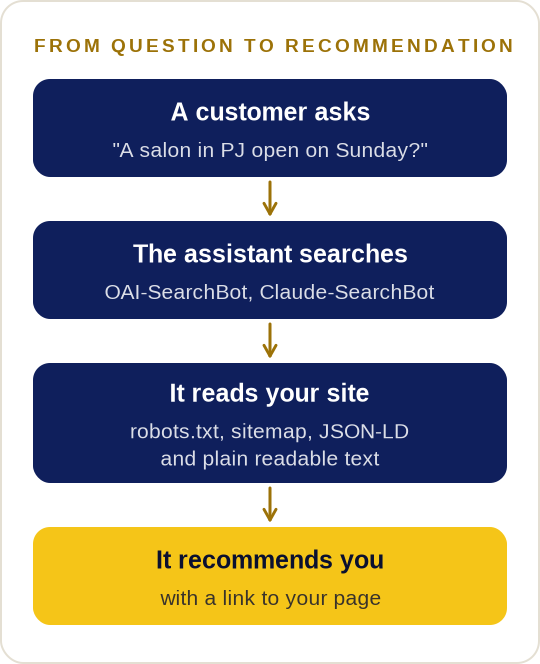
Three things decide whether you make the shortlist:
- Can it reach you? Your site must allow the search crawlers. A single line in robots.txt, or an over-eager firewall, can make you invisible.
- Can it understand you? The page needs plain text that says what you do, where you are and who you serve. A beautiful page that is mostly images or animations says very little to a machine.
- Does it trust you? Assistants lean on the same signals as search engines: consistent details across the web, real reviews, clear contact information and pages that answer questions properly.
Which Crawlers Visit Your Site
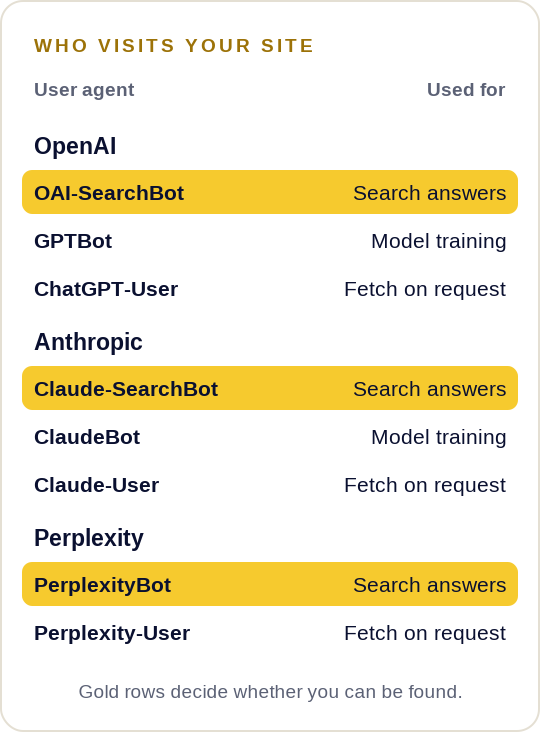
Each AI company runs more than one bot, and they do different jobs. This matters because blocking the wrong one can remove you from AI answers while you only meant to opt out of model training.
OpenAI
OpenAI documents three main agents. OAI-SearchBot surfaces websites in ChatGPT search, and OpenAI says sites that opt out of it will not be shown in ChatGPT search answers. GPTBot collects content that may be used to train its models, and it is controlled separately. ChatGPT-User visits a page when a user asks ChatGPT to, and OpenAI notes that robots.txt rules may not apply to these user-initiated visits.
Anthropic
Anthropic runs ClaudeBot for training data, Claude-SearchBot to improve the quality of Claude's search results, and Claude-User for pages fetched when a person asks Claude a question. Anthropic states that its bots honour robots.txt, and that blocking Claude-User or Claude-SearchBot can reduce your visibility in Claude's answers.
Perplexity
Perplexity runs PerplexityBot to surface and link websites in its results, and Perplexity-User for fetches a user triggers. Perplexity says the user fetcher generally ignores robots.txt, because a person asked for the page.
What This Means For You
If you want to be recommended, allow the search crawlers: OAI-SearchBot, Claude-SearchBot and PerplexityBot. Whether you allow the training crawlers (GPTBot and ClaudeBot) is a separate business decision, and blocking them does not remove you from search answers.
The Five Fixes That Matter Most
You do not need a new kind of website. Google says plainly that there are no special requirements or AI text files needed to appear in its AI Overviews and AI Mode; the normal search fundamentals apply. The same fundamentals serve ChatGPT and Claude well.
1. Open The Door In robots.txt
Check yoursite.com.my/robots.txt. Look for Disallow: / under User-agent: * or under any of the bots above. Then check your hosting or CDN settings: some bot protection features challenge crawlers by default, which silently blocks them. A clean robots.txt that allows search crawlers and points to your sitemap is the foundation.
2. Say What You Do In Plain Text
Write one clear sentence near the top of your home page: what you do, for whom, and where. "Family hair salon in SS2, Petaling Jaya, open seven days, walk-ins welcome" beats "Style that inspires". Then give each service its own page with a proper heading, a short description, prices or price ranges where you can, opening hours and the areas you serve. Assistants quote text, so give them text worth quoting.
3. Add Structured Data
Structured data in JSON-LD tells machines the facts behind your page: your business name, address, phone, opening hours, services and reviews. For a local business, the schema.org LocalBusiness type (or a more specific one like Dentist or Restaurant) is the place to start. Add FAQPage markup where you genuinely answer common questions. Google warns that structured data must match what is visible on the page, so do not mark up anything a visitor cannot see.
4. Keep Your Details Consistent Everywhere
Assistants cross-check. If your Google Business Profile says you close at 9pm, Facebook says 10pm and your website says nothing, you look less reliable. Use the same business name, address and phone number on your website, Google Business Profile, Facebook, Instagram, Waze and directories. Ask happy customers for reviews; they are one of the few trust signals you can build steadily.
5. Consider An llms.txt File
llms.txt is a proposed standard: a short Markdown file at /llms.txt that lists your most important pages with a one-line summary each, so an AI agent can find them quickly. It is not a formal standard and Google does not need it, but it is cheap to add and some AI tools read it. Treat it as a helpful extra after the four fixes above, not a replacement for them.
Check Your Site In Two Minutes
You can check the basics yourself in a browser. Open yoursite.com/robots.txt and make sure it does not block the AI search crawlers listed above, open yoursite.com/sitemap.xml to confirm your sitemap exists, and paste your home page into Google's Rich Results Test to see whether it carries structured data. Then view the page with JavaScript turned off: the text an assistant can read is the text you see.
Speed matters too. Crawlers and people both give up on slow pages, so if your site takes a long time to load on a phone, read why your website is slow on Malaysian phones. And because people share your recommended pages on WhatsApp, make sure your link previews look right.
What Not To Do
- Do not stuff keywords or hide text. Assistants are built on the same lessons as search engines, and tricks that look spammy hurt trust.
- Do not publish thin pages for every town in Malaysia. One strong page per real location beats fifty copies with the town name swapped.
- Do not block everything by reflex. Blocking every AI bot may feel safe, but it also removes you from the answers your customers are reading.
- Do not expect overnight results. Changes to robots.txt can take about a day to be noticed by OpenAI and Perplexity, and content changes take longer to show up in answers.
When To Get Help
Most of these fixes are an afternoon's work on a modern website. If your site is built on an old page builder that hides text in images, has no way to add structured data, or blocks crawlers you cannot control, it may be time for a rebuild.
Questions
Can I pay to be recommended by ChatGPT or Claude?
No. ChatGPT and Claude recommendations in normal answers are not sold. OpenAI has started showing clearly labelled ads in ChatGPT, but those are separate from the answer itself. Being recommended in the answer comes from being findable, readable and trusted on the web.
Will blocking GPTBot or ClaudeBot remove me from AI answers?
Not by itself. GPTBot and ClaudeBot collect training data. Search visibility is controlled by OAI-SearchBot and Claude-SearchBot, which you can allow while blocking the training crawlers.
Do I need an llms.txt file?
It is optional. Google says it does not need any AI text files for its AI features. llms.txt is a lightweight proposal that some AI tools read, so it is worth adding once robots.txt, readable text and structured data are in place.
How long does it take to start appearing in AI answers?
It varies. Crawlers notice robots.txt changes within about a day, but being cited depends on how often your pages are crawled and how well they answer the question. Expect weeks rather than days, and keep your content and reviews current.
Does my Google Business Profile matter for AI assistants?
Yes, indirectly. Google says keeping your Business Profile current helps in its AI features, and consistent details across your profile, website and social pages make your business look more reliable to every assistant.
Sources
- OpenAI: Overview of OpenAI crawlers
- Anthropic: Does Anthropic crawl data from the web, and how can site owners block the crawler?
- Perplexity: Perplexity crawlers
- Google Search Central: AI features and your website
- The llms.txt proposal
- schema.org: LocalBusiness
Related Articles
- PCB in Malaysia 2026, explained with one payslip (Tax And Payroll, 22 Nov 2026): What PCB is, how LHDN's 2026 formula works and why it lands where it does, walked through one example RM5,000 payslip line by line, with EPF, SOCSO and EIS.
- MyInvois e-invoicing: what SMEs must do in 2026 (E-Invoicing, 15 Nov 2026): Who must issue MyInvois e-invoices in 2026, the new RM3 million exemption, the relaxation period to 2027 and the practical steps for a Malaysian SME.
- How much does an app or website cost in Malaysia in 2026? (Apps And Websites, 9 Nov 2026): Honest 2026 ringgit ranges for a website, online shop, mobile app or business system in Malaysia, what moves the price, and the monthly running costs to budget.