Tarana Labs / Blog / Apps And Websites
Why your website is slow on Malaysian phones, and how to fix it
5 min read · 2 Nov 2026 · Tarana Labs

Your website opens instantly on the office laptop. Your customer, standing in a queue in Bangsar on a mid-range Android phone with two bars of signal, waits, sees a blank screen, and goes back to Google. If your website is slow on Malaysian phones, you lose people before they read a word, and Google notices too.
This guide explains why the same site feels so different on a phone, which three numbers Google actually measures, and what to fix first.
Why Your Website Is Slow On Phones But Fine On Your Laptop
Three things are different when a real customer visits:
- The network. Mobile data changes from street to street and floor to floor. Inside malls, lifts, LRT stations and older shoplots, a 5G icon can still mean a slow, unstable connection. Every extra file your page needs is another round trip that can stall.
- The phone. Most of your visitors are not on the newest flagship. A mid-range phone has a much slower processor than your laptop, so heavy JavaScript that runs in a blink on a desktop can freeze a phone for seconds.
- The cache. You have visited your own site a hundred times, so your browser has most of it saved. A new customer downloads everything from zero.
So the test that matters is a first visit, on a phone, on mobile data. That is exactly what Google measures, using data from real Chrome users.
The Three Numbers Google Checks
Google's Core Web Vitals are three measurements of what a visit feels like. Google says they are used by its ranking systems, and they are a good proxy for whether people stay.
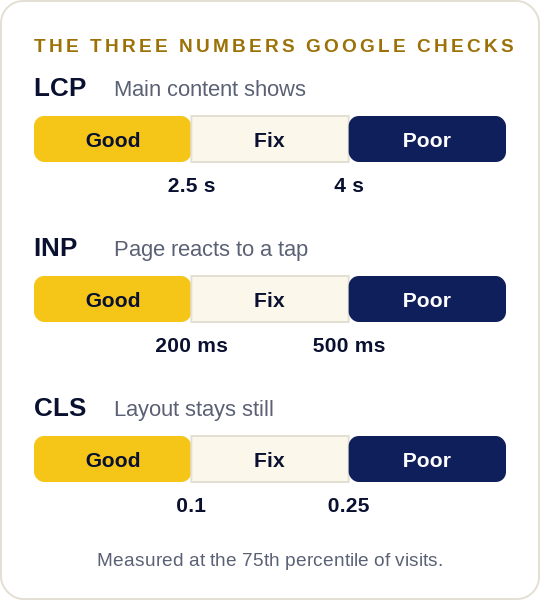
| Metric | What it measures | Good | Poor |
|---|---|---|---|
| LCP, Largest Contentful Paint | How long until the main content appears | 2.5 seconds or less | Over 4 seconds |
| INP, Interaction to Next Paint | How quickly the page reacts to a tap | 200 ms or less | Over 500 ms |
| CLS, Cumulative Layout Shift | How much the layout jumps while loading | 0.1 or less | Over 0.25 |
A page passes when 75% of visits meet the "good" mark, and mobile and desktop are assessed separately. INP replaced the older First Input Delay metric as a Core Web Vital in 2024, so if an old report talks about FID, it is out of date.
What Usually Makes Malaysian Business Sites Slow
The same culprits turn up on most small business sites:
- Huge photos. A 5 MB photo straight from the camera, shown at the size of a postage stamp. This is the most common cause by far.
- Sliders and video headers. A carousel of five full width images loads all five before the visitor sees the first.
- Too many plugins and widgets. Chat bubbles, pop-ups, social feeds, trackers and review widgets each add scripts that the phone must download and run.
- Many fonts. Four weights of two font families can mean eight files before text appears.
- Cheap, distant hosting. A server far away, with no caching, makes every page start slowly.
- Page builders. Some drag and drop builders produce very heavy pages, even for a simple layout.
What To Fix First
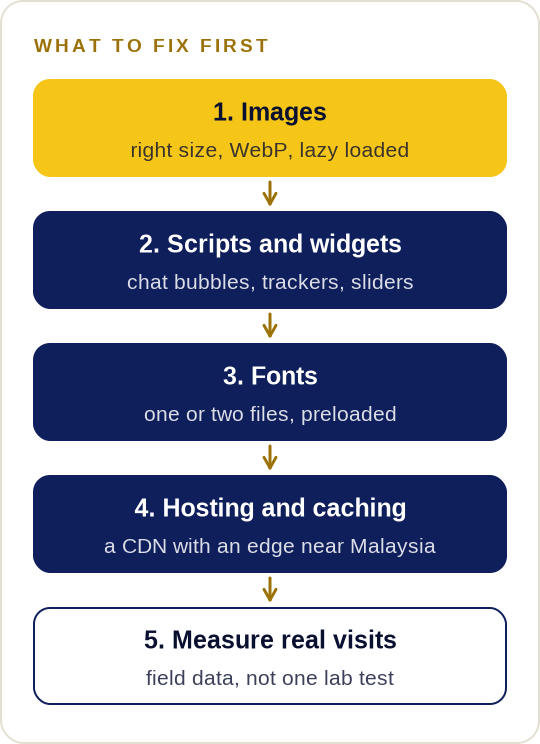
Work in this order. The first two steps usually give the biggest improvement for the least effort.
1. Images
- Resize each image to the largest size it is actually shown at. A photo shown at 800 pixels wide does not need to be 4,000 pixels.
- Use modern formats like WebP or AVIF, which are usually much smaller than JPEG or PNG for the same quality.
- Add
loading="lazy"to images below the first screen, so they load only when the visitor scrolls near them. Do not lazy load the main image at the top; that delays LCP. - Always set the width and height of images, so the browser can reserve the space and the layout does not jump.
Our free Image Compressor resizes and converts images to WebP in your browser, without uploading them anywhere.
2. Scripts And Widgets
List every third party script on your site and ask whether it earns its place. Remove what nobody uses. Load chat widgets only after the page has finished loading, or when the visitor taps a button. Replace a slider with one strong image. Each script you remove helps both LCP and INP.
3. Fonts
Use one or two font files, preload the one used for headings and body text, and use font-display: swap so text shows immediately in a fallback font while the custom font loads.
4. Hosting And Caching
Serve your site through a content delivery network (CDN) with an edge location in or near Malaysia, and cache pages and files. A static or prerendered site served from a CDN is usually fast without any further tuning.
5. Measure Real Visits
A single lab test is a snapshot. Google's PageSpeed Insights shows field data from real Chrome users when your site has enough traffic, and that is what counts. Test again after each change, on mobile.
Test Your Site Now
Run your home page and your busiest page through PageSpeed Insights on the mobile setting. It shows your Core Web Vitals and lists what is slowing the page down, with the biggest savings first.
Speed is also part of being found. AI assistants and search crawlers fetch your pages too, so a fast, light page helps you get recommended by ChatGPT and Claude. And while you are fixing images, make sure your WhatsApp link previews show the right picture.
When A Rebuild Makes More Sense
Sometimes the problem is the foundation. If your site runs on an old theme with dozens of plugins, or a page builder you cannot slim down, fixing it piece by piece can cost more than starting again.
Questions
What is a good loading time for a website?
Aim for the main content to appear within 2.5 seconds for at least 75% of visits on mobile. That is Google's "good" threshold for Largest Contentful Paint.
Does website speed affect my Google ranking?
Google says Core Web Vitals are used by its ranking systems, as part of page experience. Relevance still matters most, but between similar pages, the faster one has an edge, and it keeps more visitors.
Why does my site score differently every time I test it?
Lab tests depend on network conditions, server load and the test location at that moment. Look at field data from real users over 28 days, and compare tests run with the same settings.
Will moving to a faster host fix everything?
Better hosting helps the first part of loading, but if the page itself is heavy with large images and scripts, it will still be slow on a phone. Fix the page weight first, then the hosting.
Is WebP supported on all phones?
WebP is supported by all current major browsers, including Safari on iPhone. AVIF is newer and also widely supported; a good setup serves AVIF or WebP with a fallback for older browsers.
Sources
- web.dev: Web Vitals
- web.dev: Largest Contentful Paint
- web.dev: Interaction to Next Paint
- web.dev: Cumulative Layout Shift
- Google Search Central: Understanding Core Web Vitals and Google search results
- web.dev: Browser-level image lazy loading
Related Articles
- How much does an app or website cost in Malaysia in 2026? (Apps And Websites, 9 Nov 2026): Honest 2026 ringgit ranges for a website, online shop, mobile app or business system in Malaysia, what moves the price, and the monthly running costs to budget.
- Why your links look broken on WhatsApp: Open Graph explained (Apps And Websites, 27 Oct 2026): Why your WhatsApp link preview shows no image or the wrong title, how Open Graph tags work, WhatsApp's image rules and a quick checklist to fix it.
- How to get your business recommended by ChatGPT and Claude (AI And Search, 28 Nov 2026): How AI assistants like ChatGPT, Claude and Perplexity pick which businesses to recommend, and the five fixes that help a Malaysian business get named.