Tarana Labs / Blog / Apps And Websites
Why your links look broken on WhatsApp: Open Graph explained
5 min read · 27 Oct 2026 · Tarana Labs
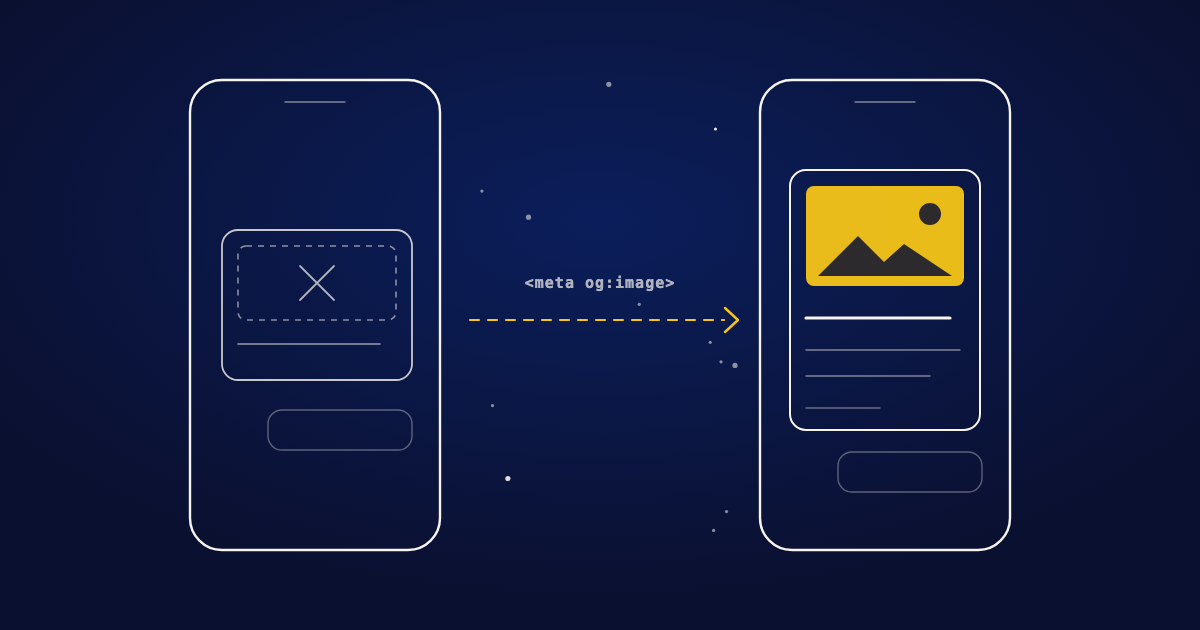
You share your new promotion in a WhatsApp group and it arrives as a bare blue link. No picture, no title, or worse, an old logo and a description from three years ago. In Malaysia, where so much business is shared through WhatsApp, a broken WhatsApp link preview costs real clicks. The fix is almost always a handful of lines called Open Graph tags.
This guide explains what Open Graph is, how WhatsApp builds a preview, the rules your image must follow and a checklist to fix a broken preview in minutes.
What Open Graph Is
Open Graph is a small set of tags in the <head> of a web page that tell apps how to show the page when it is shared. It was created by Facebook and is now read by WhatsApp, Facebook, LinkedIn, Telegram, Slack and many others. X (formerly Twitter) reads its own twitter: tags and falls back to Open Graph.
The four tags that matter most:
<meta property="og:title" content="Nasi Lemak Catering, Shah Alam"><meta property="og:description" content="Packed lunches for offices, from 20 pax."><meta property="og:image" content="https://example.com.my/og/catering.jpg"><meta property="og:url" content="https://example.com.my/catering">
Each one fills a part of the card your customer sees:
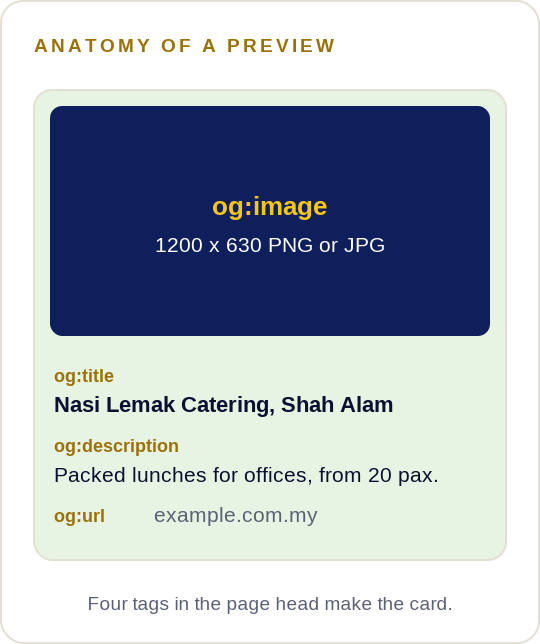
How A WhatsApp Link Preview Is Built
When you paste a link, WhatsApp fetches the page on your behalf with a simple web request and reads the tags. Its user agent starts with WhatsApp/2., which is useful if you need to allow it through a firewall. Then it downloads the image and assembles the card.
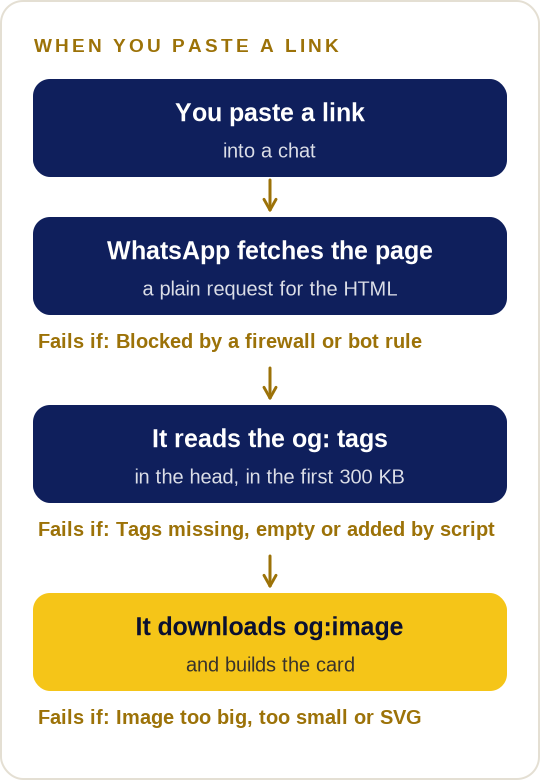
Meta's WhatsApp documentation sets out the requirements:
og:title,og:descriptionandog:urlmust be inside the<head>and must not be empty.og:imagemust be an absolute URL, starting withhttps://, not a path like/images/og.jpg.- The
<head>with these tags must appear within the first 300 KB of the HTML. - The image should be under 600 KB.
- The image should be at least 300 pixels wide, with an aspect ratio no wider than 4:1.
Meta notes that WhatsApp may fall back to a small preview when these are not met, but warns not to rely on that.
Why Your WhatsApp Link Preview Is Broken
These are the usual causes, roughly from most to least common:
The Image Is Too Heavy
A 2 MB banner straight from the designer is the classic mistake. Keep the image under 600 KB as Meta requires; many developers report that WhatsApp is more reliable when the image is well under that, around 300 KB. A 1200 by 630 pixel JPEG or PNG compresses comfortably to that size. Our free Image Compressor does it in your browser.
The Image Is An SVG Or The Wrong Shape
WhatsApp and Facebook do not use SVG images for previews. Use JPEG or PNG. A very tall or very thin image can be cropped badly or dropped; 1200 by 630 pixels, about 1.91 to 1, is the safe shape for every app.
The Tags Are Added By JavaScript
Many modern websites build the page in the browser with JavaScript. If your Open Graph tags are only added after scripts run, a preview crawler that reads the raw HTML may see nothing. Tags must be in the HTML the server sends. Prerendering or server rendering solves this.
A Firewall Blocks The Crawler
Bot protection on your host or CDN can challenge WhatsApp's and Facebook's crawlers, so they never see your page. If the preview fails only on your site and works for others, check your firewall and bot settings and allow these agents.
The Tags Are Missing, Empty Or Duplicated
Some themes leave og:description empty, or output two different og:image tags. Check the page source, not what the page looks like.
The Old Preview Is Cached
Apps remember previews. After you fix your tags, a link that was already shared may keep its old card for a while. For Facebook, Meta's Sharing Debugger lets you see what Facebook reads and ask it to fetch the page again. Adding a harmless query string such as ?v=2 makes the link look new to every app.
A Checklist For Every Page You Share
- A unique
og:titleunder about 60 characters, written for a person, not a search engine. - An
og:descriptionof one or two sentences that gives a reason to tap. - An
og:imageat 1200 by 630 pixels, JPEG or PNG, ideally under 300 KB, with an absolutehttps://URL. - An
og:urlwith the clean, canonical address of the page. - All tags in the server HTML, inside the
<head>, near the top. - Your firewall lets the WhatsApp and Facebook crawlers through.
- Text in the image kept large and central, because some apps crop the edges.
For product and promotion pages, design a dedicated share image with your offer and logo instead of reusing a random photo. It is a small effort that makes every share look intentional.
Good previews also tie into the rest of your site's health. Fast pages make for fast previews, so read why your website is slow on Malaysian phones, and if you are automating your customer chats, see WhatsApp automation for SMEs.
Questions
What size should an Open Graph image be for WhatsApp?
Use 1200 by 630 pixels in JPEG or PNG. Meta's WhatsApp documentation asks for at least 300 pixels wide, an aspect ratio no wider than 4:1 and a file under 600 KB. Aiming for about 300 KB is safer.
Why does my link show a preview on Facebook but not on WhatsApp?
Usually the image is too large for WhatsApp, or the tags appear too far down the HTML. WhatsApp needs the head within the first 300 KB of the page and an image under 600 KB, while Facebook is more forgiving.
How do I refresh an old WhatsApp preview?
There is no public tool to clear WhatsApp's cache. Fix the tags, then share the link with a small change such as ?v=2 at the end so it is fetched as a new link.
Do I need Open Graph tags on every page?
Yes, on every page that might be shared: products, promotions, articles and your home page. Without them, apps guess, and they often guess badly.
Are Open Graph tags good for SEO?
They do not directly change Google rankings, but they improve how your links look when shared, which brings more clicks and visits from social and messaging apps.
Sources
- Meta: WhatsApp link previews
- The Open Graph protocol
- Meta: Sharing Debugger
- Meta for Developers: Webmasters guide to sharing
Related Articles
- How much does an app or website cost in Malaysia in 2026? (Apps And Websites, 9 Nov 2026): Honest 2026 ringgit ranges for a website, online shop, mobile app or business system in Malaysia, what moves the price, and the monthly running costs to budget.
- Why your website is slow on Malaysian phones, and how to fix it (Apps And Websites, 2 Nov 2026): Why a website that feels fine on office Wi-Fi is slow on a customer's phone, the three Core Web Vitals Google checks, and what to fix first, in order.
- How to get your business recommended by ChatGPT and Claude (AI And Search, 28 Nov 2026): How AI assistants like ChatGPT, Claude and Perplexity pick which businesses to recommend, and the five fixes that help a Malaysian business get named.